
Archive for the Marketing
5 Ways To Drive Customers Away From Your Website
March 15th, 2012
We all want visitors to our website but more importantly we want them to stay and spend money on our website. Below is a list of five ways on how to drive visitors away from your website screaming “Get me outta here!” If you prefer being alone with your website and don’t want all those pesky visitors bothering you, then follow the guidelines below and you’ll get rid of them quick as a blink.
1. Don’t state on your website what you do or what you sell. Make it a complete mystery. It’s like a secret club — your visitors are left in the dark. Have you been to websites like this where you show up and think “What the heck is this site about?” If you’re not presenting a clear statement about why your visitors should spend their money (or at least come back again), then you’re on your way to the bottom of the abyss.
2. Overwhelm visitors with lots of information. Almost as bad as the “What the heck is this site about?” problem is the “Oh my Goodness! Oh my Gracious!” sites. As a visitor, you know the sites I’m talking about. The page opens and your jaw drops. There is a sea of banners and links everywhere. Where do you go? What do you do? I’ll tell you what I do: Click the little “x’ in the upper right-hand corner to get the heck outta there!
3. Make the ordering process really complicated. There’s nothing I love more than putting items into my shopping cart and then spending 20 minutes trying to figure out how to set up an account and pay. Guess what? I sure don’t click the ‘contact us’ button. I click the “x” instead. You’ve succeeded in getting rid of yet another pesky customer who wanted to spend money.
4. Fill your site with outdated information and broken links. Phew. You dodged a visitor with that one. They clicked on a link that was broken — and off they went.
5. Make sure there’s no way for an interested customer or business partner to contact you. Heaven forbid, you might get some spam if you have your contact information on your site.
Thank Goodness you don’t have those gosh-darned customers emailing you while you’re trying to read up on your favorite celebrity’s love life.
Obviously, I’m being silly, but you do know that these examples are true. You’ve seen sites that seem like they are trying to drive you away. If you are spending time and energy putting up a website to make money, then make sure you do it right!
5 Tips to Customize Your Facebook Fanpage Timeline
March 12th, 2012
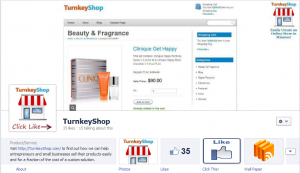 With the deadline for the new Facebook timeline fast approaching on March 30th, 2012, you will need to convert to the new format sooner rather than later. Your current images may not be optimized to fit the new timeline format. You will also need to set a Cover Photo to make your page look more professional. In addition, calls to action on the new Cover Photo are not allowed under the terms of service. So what can we do to continue to get more Likes with the new Timeline format? Below are five ways to customize and optimize your Facebook’s timeline…
1. Direct people from your website to a Welcome tab
If you currently have an iframe page tab setup to direct fans to a call to action (most likely to click the “Like” button), it will no longer default to that page from your vanity URL. However. each tab still has an unique URL that you can use to send people directly from your website, article, signature, etc. One benefit of the new tab pages is more horizontal space to get your message across.
2. Point arrows on your Welcome page to the top right
The Like button used to be in the top left area of a Page tab. On the new Facebook tab pages, the Like button is in a fixed position on the top right of the Page tab. If you currently have an arrow on an iframe Page tab, you should probably change it to point to the top right.
3. Use custom tab images for calls to action
On the new Facebook timeline, there are visible tab images (111 x 74 pixels) which contains plenty of room to include text and images. You can get creative with these by adding call to action text within the images too. You can also select which tabs you want to be visible.
4. Add a Click Like arrow to your Profile Picture
Although Facebook doesn’t allow calls to action on your Cover Photo, they don’t say anything about having a call to action on your Profile Picture. You can sneak in a subtle suggestion to click the Like button that’s to the right of your profile picture.
5. Pin and/or Highlight great content on your timeline
You can pin specific content to the top of your timeline and pinned posts will stay at the top for seven days. If you have a particularly popular blog post, be sure to pin it (and pin it again). You can also highlight specific content on your timeline which will increase the size of the post on the timeline.
Make sure to test multiple approaches to find what works best for your brand and remember that people will be more willing to Like your page if they see it as a source of great content that’s relevant to them in some way.
Please feel free to post your comments below with any approaches or tips to maximize the new Facebook timeline.
What does it take to be successful with a eCommerce Website?
August 3rd, 2011
This is a good question that comes up a lot, so we’ve decided to put our thoughts down as to what you need to be successful with a eCommerce website.
The Right Mindset
If you’re starting out as a complete newbie in online sales, at some point you might become frustrated, so to compensate you need to have a positive attitude. It’s so important to believe in yourself and have faith that you too can learn the skills necessary to do this. It’s key, that you need to be in the learning mindset to succeed. Even though you might be using a turnkey eCommerce website there will still be things to learn. Do not listen to those who try and put you down or tell you that what your trying to do won’t work or there is too much competition.
Read the rest of this entry »
How do you increase sales in your shop?
May 11th, 2010
Start with the copy.
Persuasive and interesting copy (the text on the page) is a key component to making your website stand out. Clear and compelling product descriptions, special offers and romantic stories about how products will positively impact your customers lives are what turn visitors into customers.
If you’re at all interested in search engine traffic, you have to start with generating content for your website, and written content is the fastest and easiest to spread option.
Copy writing can be intimidating at first, but rest assured that anyone can become an effective copywriter with the right information and lots of practice. Below, we’ve assembled some of our favorite resources that are sure to give you a head start over competitors who don’t understand the power of copy.
Read the rest of this entry »